
🏷️ Overview
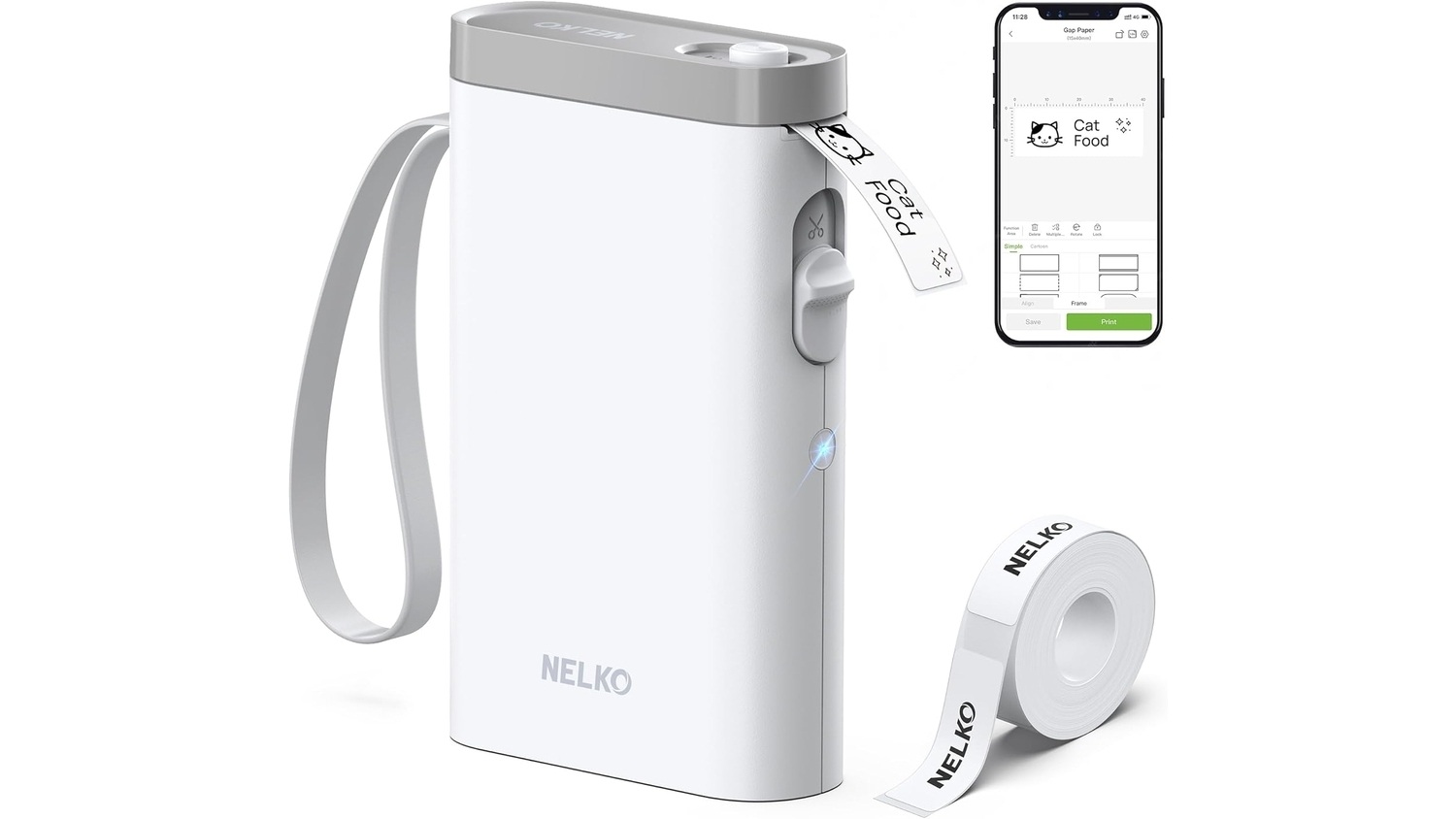
The Nelko P21 is a compact Bluetooth label maker that connects to iOS and Android devices using the Nelko mobile app. It’s designed for organizing your home, office, or even small business 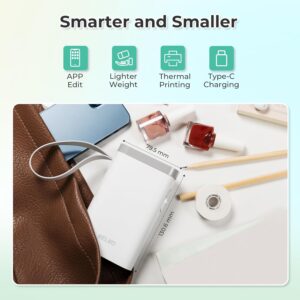 operations. This printer uses direct thermal printing, which means you don’t need to buy ink or toner—ever.
What’s in the Box:
-
Nelko P21 label maker > Shop at Amazon for only $29.99 (18.99 for Prime Members)
-
A roll of thermal label tape (usually 180 labels)
-
Type-C charging cable
-
Quick-start guide
-
Wrist strap for easy carrying
📐 Design & Portability
The P21 is sleek and compact, measuring about 6.6 by 4.5 inches and weighing less than 12 ounces. It fits easily in a handbag, backpack, or desk drawer. The build quality feels solid, and it comes with a wrist strap so you can carry it without worrying about dropping it.
This label maker is smaller and lighter than traditional models, making it ideal for on-the-go organization.
🤖 Setup & App Experience
Setting up the P21 is fairly simple:
-
Download the Nelko app from your app store.
-
Power on the label maker by holding the button.
-
Pair the device using Bluetooth in the app.
-
Choose your label size and design your label.
The app offers a lot of customization. You can choose from over 90 fonts, hundreds of label templates, and even add barcodes, QR codes, and small images. It’s easy to navigate, although there might 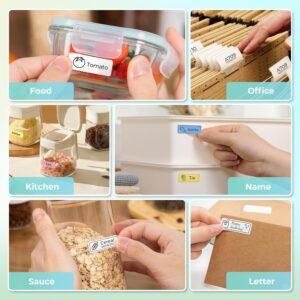 be a slight learning curve for first-time users or those less comfortable with mobile apps.
Occasionally, users report minor Bluetooth connection issues, especially on newer Android devices. Restarting the app or phone usually solves the problem.
🖨️ Printing Quality & Speed
-
Resolution: 203 DPI (dots per inch), which delivers crisp text and clear images for small labels.
-
Speed: It prints at about 60mm per second—fast enough for everyday use but not designed for high-volume industrial work.
The printer supports only black-and-white printing, so if you’re looking for color, this may not be the right choice. However, using colored or patterned label tapes can give your labels some extra personality.
🔋 Battery & Supplies
The P21 includes a built-in 1200 mAh rechargeable battery, which lasts through multiple printing sessions before needing a charge. It charges using the included USB-C cable.
It uses thermal label tape rolls, which are affordable and easy to replace. There’s no need to worry about ink cartridges or toner. The label tape is available in several sizes, such as 12×40 mm, 14×40 mm, 15×40 mm, and 14×75 mm. Note that it doesn’t support continuous or adjustable-width labels.
To get the best print quality, it’s recommended to use Nelko-brand label tape. Off-brand options may result in fainter prints.
🎯 Best Uses & Who It’s For
The Nelko P21 is perfect for:
-
Home organization: Labeling kitchen jars, storage bins, charging cables, and clothing containers.
-
Office use: Tagging files, drawers, and cords, or creating sticky reminders.
-
Small businesses: Making price tags, QR codes, shipping labels, and barcodes.
-
Crafting & DIY: Customizing gifts, scrapbooks, or planners.
This label maker is a great fit for parents, teachers, small business owners, or anyone who loves to stay organized.
⚖️ Pros & Cons
✅ Pros
-
Portable and lightweight
-
Inkless printing (no cartridges needed)
-
Customizable app with fonts, templates, and design tools
-
Rechargeable battery
-
Great value for the price
❌ Cons
-
Black-only printing
-
Fixed label sizes only
-
Mobile-only (no desktop app or computer support)
-
Minor Bluetooth or app bugs reported
-
Labels are water-resistant but not waterproof
💰 Price & Value
The Nelko P21 usually sells for around $25 to $40, depending on promotions and bundles. Considering that it doesn’t require ink and uses affordable label rolls, it’s a very cost-effective option over time.
Compared to other label makers with similar features, the P21 stands out for its balance of quality, portability, and price.
📝 Tips for Best Use
-
Be sure to keep the green sticker intact when loading label tape. It helps the machine detect the labels properly.
-
Use original Nelko tape for the best print results.
-
If the app feels overwhelming at first, try starting with a basic template and exploring more features gradually.
-
Check for app updates regularly to fix potential bugs or connection issues.
⭐ Final Verdict
The Nelko P21 Bluetooth Label Maker is a small but powerful tool that makes home, office, and business organization easier than ever. With its sleek design, inkless printing, long battery life, and customizable app, it offers excellent functionality at a very reasonable price.
While it has some limitations—like black-only printing and fixed label sizes—it’s a fantastic choice for most casual users and light business needs. Whether you’re labeling your pantry, organizing a craft studio, or managing small product inventory, the P21 is up to the task.
If you’re looking for an affordable, portable, and reliable label maker, the Nelko P21 is absolutely worth considering.

Need an alternative? Check out our Nimbot Label Maker Review